
1 Introduction
Congratulations on your new Sandberg Bluetooth Office Headset Pro.
Sandberg Bluetooth Office Headset Pro is a Bluetooth headset with a comfortable headband. The headset connects wirelessly to your smartphone or other Bluetooth device. This way you have your hands free to type on your keyboard, or you can walk freely away from your desk. The speaker and microphone are of superior quality, ensuring crystal clear sound. Included in the box is an elegant charging dock to charge the headset when it's not in use.
2 Overview of parts supplied
A. Bluetooth Headset
B. Charging base stand
C. Micro USB charging cable
D. User guide

3 Connecting the charging base stand
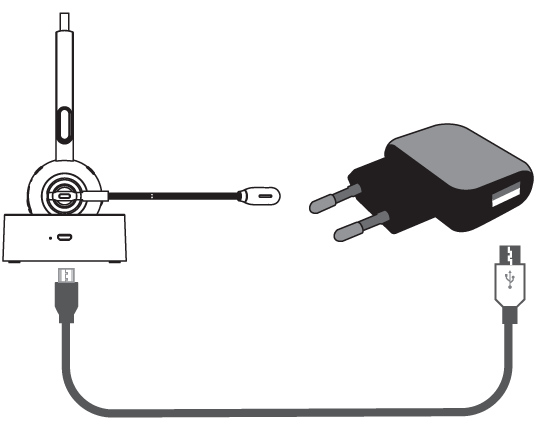
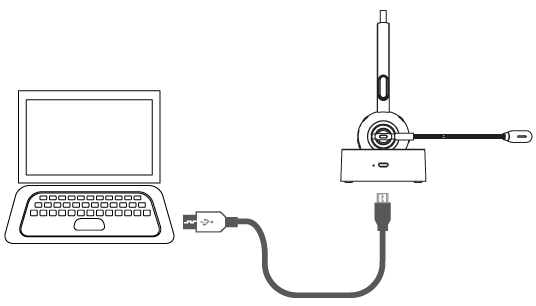
A magnetic charging base stand is included with your Sandberg Bluetooth Office Headset Pro. Use it to charge the headset when not in use. The magnetic holding function ensures correct positioning over the charging contacts, and easy retrieval when the phone rings. Connect the base stand to a USB power source using the Micro USB cable supplied as shown on the illustration:
4 Getting started
4.1 Connecting to a mobile
The headset connects to a mobile phone using Bluetooth. Pair the headset with your phone the first time you use it. The two devices will remain paired and the headset will normally automatically find your phone when switched on and within range. Check the table in section 5 concerning pairing and restoring a link with already paired devices (if they do not connect automatically). In the list of Bluetooth devices on your phone, the headset will be displayed as "Sandberg Office Pro". Ensure headset and phone are within 1 metre of each other for pairing, and then set your phone to search for new Bluetooth devices. Refer to your phone's user guide if necessary.
Activate the pairing mode on the headset by holding down the MFB button for approx. 8 seconds when the headset is off. Your phone will display "Sandberg Office Pro" as a found device. Touch the name to connect. The devices will now be paired and you can listen to music and receive calls via the headset.
4.2 Connecting another phone
If you want to use the headset for two phones at the same time (e.g. a work phone and a private phone), follow these instructions:
- Deactivate Bluetooth on the first phone the headset is paired with.
- Press the MFB button twice to put the headset into pairing mode.
- Put the second phone in pairing mode and connect to the headset as described in point 4.1.
- Reactivate Bluetooth on the first phone. Go to Settings, Bluetooth devices, and select "Sandberg Office Pro" from the list of paired devices.
- The headset will now be paired to both devices.
NB: music can only be played from the first phone when two phones are connected. Certain other functions are also restricted. Refer to the table for details.
5 Buttons on the earpiece
There are buttons on top of the headset for volume control (+/-). One or more short presses on + or - will adjust the volume up or down. A long press (approx. 1 second) will skip to the next or previous track respectively when playing music from a playlist.
There is also a Micro USB port on the earpiece allowing you to charge the headset without use of the base stand. The same Micro USB cable can be used for this.
In the middle of the earpiece is the multifunction button (MFB), which gives access to a range of functions depending on the situation. All the options are listed in this table:

Operating the MFB button |
Function |
How to do |
LED colour |
On |
When the headset is off, press for approx. 3 seconds. |
off to blue flash |
Off |
When the headset is on, press for approx. 5 seconds. |
blue flash to red flash to off |
Activate
pairing
mode |
When the headset is off, press for approx. 8 seconds.
When not connected in standby mode, press rapidly twice.
|
blue/red flash |
Play/Pause |
Rapid single press when music is playing. |
blue flash |
Redial last
number |
When connected, press rapidly twice. |
blue flash |
Reconnect |
To connect a previously paired phone to the headset in standby status, press for approx. 3 seconds. |
blue flash |
Voice
control/Siri |
When the headset is on and connected, press for approx. 1 second. |
blue flash |
Switch audio |
Press for approx. 1 second during a call to switch audio from headset to phone. |
blue flash |
Answer call |
When connected, press once quickly. |
blue flash |
Hang up |
Rapid single press during call. |
blue flash |
Reject call |
When the phone is ringing, press for approx. 1 second. |
blue flash |
Key to LED mode indicator |
Mode |
LED colour |
On and connected |
blue flash every second |
Off |
1 red flash, then off |
Pairing mode |
alternate blue/red rapid flash |
Unconnected standby |
blue flash every 2 seconds |
Connected standby, or in use |
blue flash every 5 seconds |
Charging in progress |
sustained red |
Fully charged |
sustained blue |
6 Charging the headset
Charge the headset as described with the base stand or with the USB cable connected directly to the earpiece. This can be practical when using in the car, or e.g. on the move and connected to a powerbank.
The built-in battery takes approx. two hours to charge and gives enough power for approx. 17 hours of use or 200 hours standby. See the previous table for reading charging status on the indicator LED.
NOTE: The headset turns off automatically after 10 minutes of disconnection from a phone.
The Sandberg Bluetooth Office Headset Pro is now installed and ready for use. Enjoy!
|