• Mini Bluetooth Keyboard UK
  • Mini Bluetooth Keyboard UK

    ThumbnailThumbnailThumbnail
    This product has been discontinued
    Item no.: 630-41
    EAN: 5705730630415

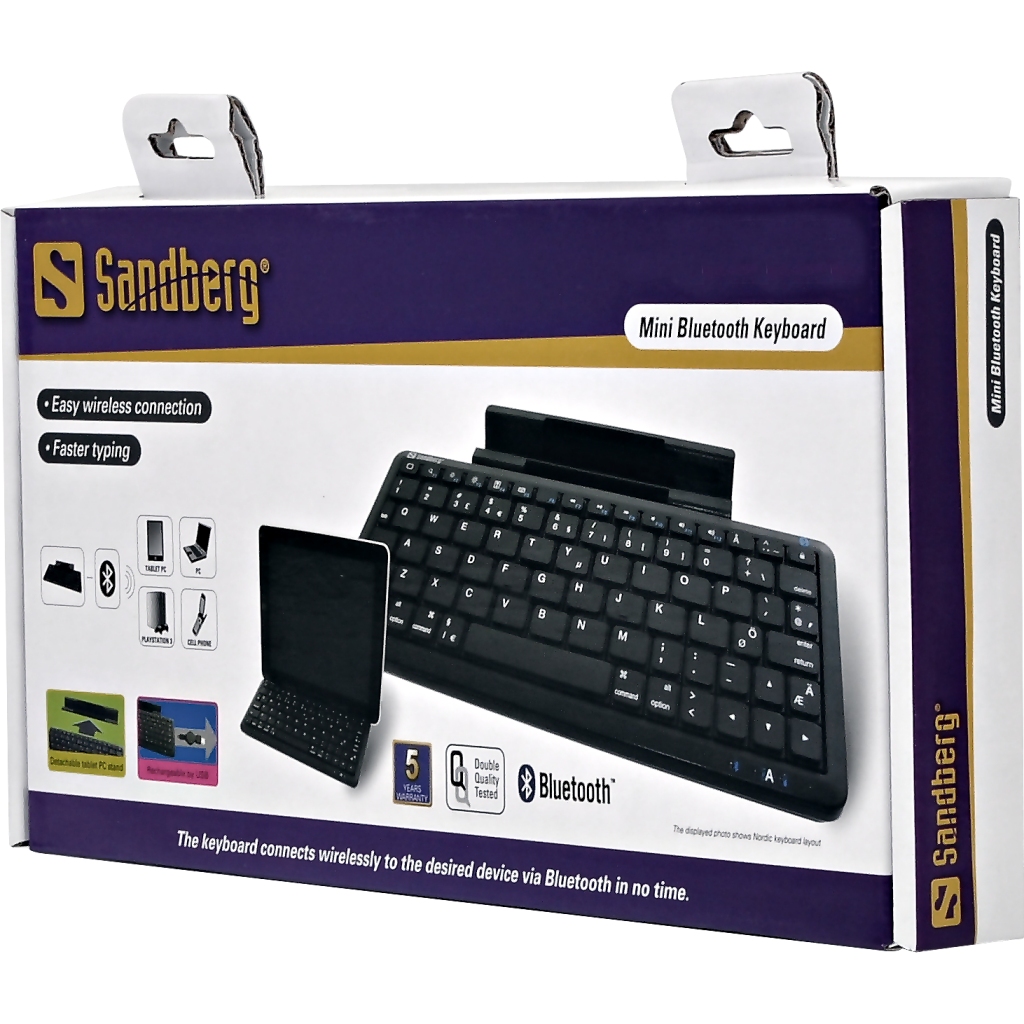
    The Sandberg Mini Bluetooth Keyboard is a handy and time-saving solution for lots of different Bluetooth devices. Typing on the screen of a tablet PC, with the joypad for a games console or on a computer connected to the TV can be a slow process. This is the solution! The keyboard connects wirelessly to the desired device via Bluetooth in no time. The built-in battery is charged using the enclosed USB cable, so you never have to worry about replacing batteries. Put a tablet PC in the enclosed stand and your tablet PC becomes a laptop that is easier to work with.

    [Download PDF]

    • Komputer for Alle says:
      »An impressive battery time of 120 hours.«
    • eReviews.dk says:
      »Really ingenious. A cool gadget.«
    • Komputer for Alle says:
      »As an extra clever feature, the keyboards charges via the USB port.«
    • Teknik og Viden says:
      »Place your iPad in the holder and hey presto! you have a real keyboard and can use your iPad as monitor - not unlike a laptop.«

    Dimensions

    The measurements refer to the product and packaging respectively.
    Product Package
    Height: - cm 15.00 cm
    Width: - cm 30.30 cm
    Depth: - cm 3.00 cm
    Weight: - g 600 g
    • 1 Sandberg Mini Bluetooth Keyboard
    • 1 Tablet PC stand
    • 1 Retractable USB charging cable
    • 1 User guide
    • Bluetooth interface (HID)
    • 3 LED lights
    • 1 USB mini-B female connector for charging
    • Built-in lithium battery (charges fully in 2 hours)
    • Operating distance: Up to 10 metres
    • Power consumption:0.5 W max
    • Power supply:+3.7 V ± 5%
    • Power current:Max 15 Ma
    • Working current:3 Ma
    • Dimensions: 217(L)×92.5(W)×19(H) mm
    • Weight (with PC tablet stand):265 g

    Contact the Sandberg Helpdesk

    If you cannot find answers to your questions about your product, please contact the Sandberg Helpdesk and get a quick response on weekdays:

    » Contact the Sandberg Helpdesk

    Manual

    FAQ

    • Does the @ key not work?
      The @ key only works on iPad and iPhone. But you can get the @ sign to appear by pressing SHIFT and " (bottom right corner).
    • Why doesn't the keyboard work with my Android?
      Unfortunately, not all Android versions support bluetooth HID devices, such as your keyboard. But in most cases you can solve this issue by downloading the BlueInput app from Android Market.
    This page is also available in the following languages: