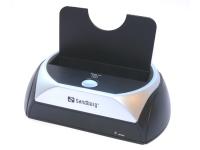
The easiest way to connect a hard disk
PRESS RELEASE
%n%The Sandberg SATA Docking Station must be the easiest way ever to connect a hard disk. The device itself is inserted into one of the computer's USB ports whilst the computer is switched on, without using any drivers. It appears as a new drive letter, just like a USB memory key does. You then simply insert the hard disk into the slot at the top and the job is done. You can also use eSATA to achieve top speeds.PRESS RELEASE
The SATA Docking Station comes with backup software which you activate by pressing the button on the SATA Docking Station. This program enables you to set the folders you want to make backups of each time the backup button on the device is pressed. Once you have done this, all you need to do in future is press a button whenever you want to make a backup.
Erling Hoff Petersen, Sales Director at Sandberg A/S, explains: "Simple backup solutions are very popular. We've noticed that if it gets a bit difficult, lots of people simply don't bother backing up their data at all. This is not a good idea, especially when one day you could lose masses of data and live to regret skipping the most basic security step."
Erling Hoff Petersen continues to enthuse about the Sandberg SATA Docking Station: "We've created a device which is really fast because it uses eSATA. We've even added a bracket to the pack so you can convert the internal SATA on a desktop computer to eSATA if necessary. Naturally this is a bit more time-consuming than simply inserting it into a USB port. But the speeds you can reach! It's totally amazing. What I really like is that we've made it a straight choice between the two connection methods by putting them both in the same device."
The Sandberg SATA Docking Station is not just an excellent backup solution. It's also ideal for transporting data and transferring files from an old to a new computer.
Press contact: Product Manager Anders Petersen, direct phone +45 4822 2285, e-mail: [email protected]